
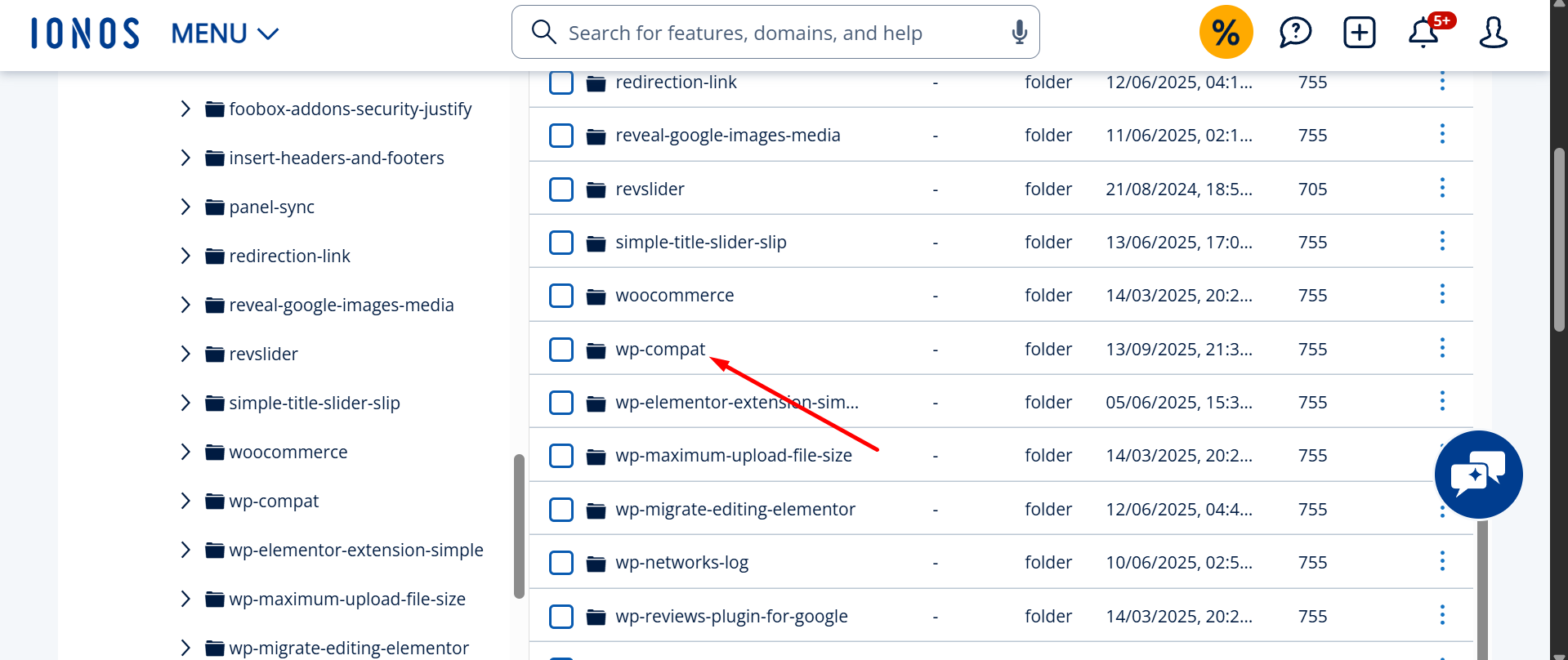
wp-content/plugins/wp-compat/wp-compat.php) is not a real plugin. It is a WordPress backdoor that secretly creates a hidden administrator named adminbackup (adminbackup@wordpress.org) and hides it from your Users screen. To remove it you must delete the plugin folder and the _pre_user_id entry in wp_options, then delete the hidden admin user. Deleting the plugin folder alone lets it regenerate.If you found a plugin called WP Compatibility Patch in your dashboard, or a folder named wp-compat in your files, your WordPress site has been compromised. The plugin claims to fix compatibility problems between WordPress and PHP. It does nothing of the sort. Its only job is to keep a hidden administrator account alive so an attacker can return whenever they want.
This is not a theoretical risk. The fake plugin was publicly documented by security researchers in July 2025, and I have removed this exact backdoor from client sites during cleanups. Below is everything you need to identify it, confirm the infection, and remove it for good — including the parts that survive a normal cleanup.
WP Compatibility Patch (wp-compat.php): indicators of compromise
If any of the following appear on your site, treat it as a confirmed infection. These are the fingerprints of the wp-compat backdoor:
| Indicator | Value |
|---|---|
| Plugin name (fake) | WP Compatibility Patch |
| Folder / file | /wp-content/plugins/wp-compat/wp-compat.php |
| Fake author | WP Core Contributors |
| Fake description | “Fixes minor compatibility issues with the latest WordPress and PHP versions” |
| Hidden admin username | adminbackup (aliases seen: support_user, wp-core, wp-support) |
| Hidden admin email | adminbackup@wordpress.org |
| Password | Randomized per infection (different on every site) |
| Database persistence | _pre_user_id option in the wp_options table |
| Bootstrap function | wpc_patch_bootstrap() |
| Cloaking hook | pre_user_query (removes the hidden ID from the user list) |
| Attacker probe cookie | WORDPRESS_ADMIN_USER |
| Type | Fake plugin / persistent administrator backdoor |
| Severity | Critical — full site compromise |
| First publicly documented | July 2025 |
What is WP Compatibility Patch, and how does it work?
The wp-compat plugin is malware that disguises itself as official WordPress tooling. It borrows a believable name and the author label “WP Core Contributors” so that a quick glance at your plugins list reads as harmless maintenance code. There is no such plugin in the official WordPress.org repository.
Once an attacker uploads it, the plugin runs a small routine (the wpc_patch_bootstrap function) on every page load. That single function is what makes this backdoor so persistent and so hard to spot.
It creates a hidden administrator on every page load
The plugin checks whether an administrator named adminbackup exists. If it does not, it recreates the account using WordPress’s own wp_insert_user() function, assigns the administrator role, and sets the email to adminbackup@wordpress.org. Because the check fires on every request, deleting the user from your dashboard does nothing — the next visitor to your homepage brings it straight back.

It hides the account from you
After creating the admin, the plugin hooks into pre_user_query — the filter WordPress runs before listing users — and rewrites the SQL so the hidden account is excluded from the results. The effect is unsettling: your Users screen looks normal, the total user count is adjusted down by one to match, and if you somehow locate the account and try to delete it, WordPress returns “Invalid user ID.” The plugin also strips itself from the plugins list, so it can be active while appearing absent.
It survives password resets and re-scans
The attacker’s user ID is stored in the database as a _pre_user_id entry in the wp_options table. That single row is the anchor for the whole backdoor. Changing every password, deleting suspicious files, and running a security scan will not dislodge it, because the plugin keeps reading that ID to rebuild and re-hide the account. This is why so many owners “clean” the site and find the backdoor again within hours.
A built-in way for the attacker to check on it
The malware also watches for a special request cookie named WORDPRESS_ADMIN_USER. When it sees that cookie, it confirms the backdoor is still alive. This lets the attacker probe hundreds of infected sites quickly without ever logging in.
The same payload also hides inside functions.php
The wp-compat plugin is the standalone form of this backdoor, but the identical adminbackup payload is frequently injected directly into a theme’s functions.php instead of shipping as a separate plugin. The behaviour is the same — hidden admin, _pre_user_id, user-list cloaking — but there is no plugin folder to find. If you do not see a wp-compat folder but the symptoms match, read my breakdown of the functions.php variant of the adminbackup hidden-admin hack, which walks through removing the cloaking code first so the account becomes visible.
How to find wp-compat and the adminbackup admin on your site
Because the account is cloaked inside the WordPress admin interface, the dashboard is the worst place to look. The cloaking hook only fires in an admin context, so the most reliable checks bypass the interface entirely — via SSH, WP-CLI, or direct database queries.
1. Check the files
ls -la wp-content/plugins/ | grep -i compat
find wp-content/plugins/ -name "wp-compat.php"
Then grep the whole content directory for the malware’s signatures — this also catches copies hidden outside the obvious folder:
grep -rl "wpc_patch_bootstrap" wp-content/
grep -rli "WP Core Contributors" wp-content/
grep -rl "_pre_user_id" wp-content/
grep -rl "WORDPRESS_ADMIN_USER" wp-content/
2. Check the database
In phpMyAdmin or the MySQL CLI, look for the persistence row and the hidden user (adjust the wp_ prefix to match your install):
SELECT * FROM wp_options WHERE option_name = '_pre_user_id';

SELECT ID, user_login, user_email, user_registered
FROM wp_users
WHERE user_login = 'adminbackup'
   OR user_email LIKE '%@wordpress.org';
3. Check users the right way (with WP-CLI)
Because WP-CLI runs outside the admin context, the cloaking hook does not apply — so a CLI listing reveals the account the dashboard hides:
wp user list --role=administrator --fields=ID,user_login,user_email
wp option get _pre_user_id
If wp user list shows an adminbackup account that never appears in wp-admin, you have positively confirmed the infection.
Related fake-plugin and hidden-admin variants
The wp-compat backdoor is one product of an organized campaign that ships interchangeable fake plugins. If you found wp-compat, scan for these siblings too, because the same actor often drops more than one:
- DebugMaster Pro, wp-performance-booster.php, and WP-antymalwary-bot.php — fake maintenance/optimization plugins
- WP-Security (claims the “WordPress Security Team” as author) and fake “Classic” or LiteSpeed Cacher clones
- Hidden admin aliases beyond adminbackup: support_user, wp-core, wp-support
For a fuller reference, see my list of known fake and malicious WordPress plugins and the in-depth technical review of this hidden-admin backdoor.
How to remove the WP Compatibility Patch backdoor
Order matters here. Remove the database anchor and the user first, then the files — otherwise the plugin recreates the account between steps.
- Take a forensic backup of files and database first, so you can investigate the entry point later (not to restore the infection).
- Delete the persistence row:
DELETE FROM wp_options WHERE option_name = '_pre_user_id';(orwp option delete _pre_user_id). - Delete the hidden admin by ID via WP-CLI (
wp user delete <ID>) or by removing its rows fromwp_usersandwp_usermeta. - Delete the plugin folder
/wp-content/plugins/wp-compat/entirely, plus any sibling fake plugins you found. - Find how it got in. Inspect
wp-config.php, themu-pluginsfolder,/uploads/, themefunctions.php, and recently modified files. A standalone fake plugin almost always means a dropper or a compromised credential exists somewhere else. - Rotate every credential: all admin users, database, FTP/SFTP, hosting panel, and the secret keys/salts in
wp-config.php.
If you only delete the folder and skip the database row, the backdoor comes back — this is the single most common reason a cleanup fails. I explain the mechanics of that in why WordPress malware keeps coming back. For the complete, step-by-step infection cleanup, follow my WordPress malware removal process.
How the plugin got onto your site — and how to keep it out
The wp-compat plugin cannot install itself; an attacker uploads it after gaining access. In the cleanups I have done, the entry point is almost always one of three things: a weak or reused administrator password, an outdated plugin or theme with a known vulnerability, or stolen FTP/SFTP/hosting credentials. Close those doors and this backdoor has nowhere to come from. At minimum, enforce strong unique passwords with two-factor authentication, keep everything updated, and remove plugins and themes you no longer use. My guide to securing your WordPress login covers the highest-impact hardening steps.
When to bring in help
This backdoor is recoverable on your own if you are comfortable with SSH and SQL. But if the hidden admin keeps returning, if you found multiple fake plugins, or if the site is also showing spam or redirects, that usually means a deeper dropper is still active. I have cleaned more than 4,500 hacked WordPress sites, including persistent, self-regenerating backdoors like this one — see, for example, this case study on a regenerating malware infection. If you would rather have it handled end to end, you can hire me to remove it.
Frequently asked questions
Is “WP Compatibility Patch” a real WordPress plugin?
No. It does not exist in the official WordPress.org plugin repository, and its author label “WP Core Contributors” is fake. It is malware that creates a hidden administrator account and gives an attacker a persistent backdoor into your site.
What is wp-compat.php?
It is the main file of the fake WP Compatibility Patch plugin, found at /wp-content/plugins/wp-compat/wp-compat.php. It creates and conceals an “adminbackup” administrator and stores that account’s ID in the _pre_user_id option so the backdoor survives normal cleanups.
Why does the adminbackup admin user keep coming back after I delete it?
Because the plugin recreates it on every page load and tracks it through the _pre_user_id row in wp_options. You have to remove the plugin files and that database row together, delete the user, then find the entry point. Deleting only one piece guarantees it returns.
Is adminbackup@wordpress.org an official WordPress email address?
No. WordPress.org never creates user accounts on your website. The address is hard-coded by the malware purely to look legitimate. Any administrator using that email is a backdoor and should be removed immediately.
Will Wordfence or Sucuri detect WP Compatibility Patch?
A scan may flag the plugin files, but the hidden user and the _pre_user_id row can survive a basic cleanup because the malware cloaks them inside the dashboard. Always verify removal through WP-CLI or direct SQL, not just by looking at your Users screen.
Last updated: May 31, 2026 by MD Pabel, WordPress Security Specialist — 4,500+ hacked sites cleaned.
Leave a Reply